How Does the Phonic Engine Method Help Children? Through novel inventions, KidsVoyager Online provides a way for children (starting at about the age of 4 - 5), to correctly encode virtually any word they can think. This means that, using search engines and other tools for kids, they can correctly encode search terms, and successfully find things of compelling interest to them; things that draw them in; things that they want. This has turned children who hated to read into children who love to read. Children with whom we have worked have actually stated "I hate to read," and then subsequently, "I love to read." A struggling reader we worked with said "what a relief!" after experiencing KidsVoyager Online.
Upon arriving at a web page of interest, be it fiction or fact, KidsVoyager Online users can understand it almost as easily as you or I. By moving their computer mouse over links, titles, emphasized words, and paragraphs, they can navigate and read textual material "by ear" in the same way a grown-up navigates and reads by eye. When they move the mouse over text, narration begins immediately. When they move it off, it immediately stops. If they click after stopping, it picks up where it left off. They can slow down (or speed up) the narration; they can adjust levels to give them as much or little help as needed. They can click and double click words to re-hear them and to find their meanings; they can compose correctly spelled textual pieces. These novel techniques, and many more, help them learn to read; and, at the same time, permit them to learn anything at all that is of interest to them.
From the moment they learn the encoding technique, which is a similar in difficulty to learning how to use a video game controller, their ability to both understand and create (using KidsVoyager Animated StoryWriter) textual material on the Internet immediately advances by years, to about the same level as their ability to listen and speak.
Children who may be interested in using KidsVoyager Online intentionally to increase their reading ability will find that there are tools for all skills: both built-in tools, and material accessible via KidsVoyager Online on the Internet.
How Does the Phonic Engine Method Help Teachers and Parents?
With the KidsVoyager Online Phonic Engine Encoding Technique, children encode words by performing a sequence of mouse clicks that select the initial and final sounds of the words they're trying to encode. Any word of any length can be encoded in 5 - 9 mouse clicks. During this short process, children see and hear the relationships between all letters and the sounds they make, over and over (and over) again. The encoding method makes it extremely easy for teachers to teach phonics systematically, as well as vocabulary and spelling patterns, all while enhancing phonemic awareness. These skills may be taught while delving into any textual material they believe is most appropriate or motivating for a particular student, be it a whimsical story, instructions on a game-like website, or a classical work.
Reading comprehension, fluency and "higher" level skills (such as author's intent) are taught and learned using fact or fiction, easy or hard, expository or narrative text, which the students can all "read by ear" when necessary.
For a teacher working with struggling readers, several children can easily be helped concurrently, each receiving truly individual (or shared, when appropriate) instruction, within a small, supportive, group. In addition, with all the material available on the Internet, there is a substantial amount of material to work with; material which is easy to locate, and which can provide a significant savings in lesson planning time (all lessons are multisensory), as well as the cost of materials.
KidsVoyager Online is intended to be given to every student for use at home (as well as in a school or center). In this way, children can (and do) use it for your homework, school homework, and enjoyment; and learn at their own pace.
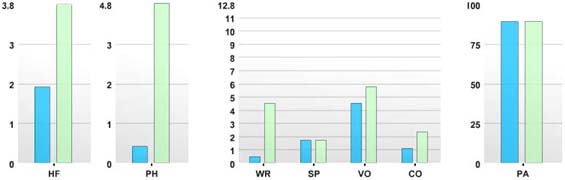
Since 2007, something remarkable has been happening at our Speech, Language, and Reading Center
in Park Slope, Brooklyn, NY. Through use of KidsVoyager Online (Phonic Engine Reading Method software), kids have been making tremendous gains in reading, spelling, and all language arts. Coming to our center only once or twice a week, and using KidsVoyager Online at home, children — ranging from those coming for enrichment, to those with severe impediments, including Auditory Processing Disorder, Phonological Processing Disorder, and Dyslexia — have made startling, life-changing,
gains.
They've also learned quite a bit of information along the way, and enjoyed themselves as well, as our method allows them to easily "read to learn" while learning to read. As stated by L. Parks, mother of of one of our clients, "What the kids don't realize, is with this fun, comes a lot of learning."
The Phonic Engine Reading Method is a transformative advance in the teaching of language arts, in that it does not require a linear approach to the teaching of language arts. What this means, is that the learner need not know one thing before the other, or learn the simple (but potentially boring) before the complex (and likely more interesting), but can learn all things in any order, or at the same time, in a manner and sequence best suited to the particular individual. A learner, beginning at age 4 – 5, does not need to know the alphabetic principle, or even the entire alphabet, before he or she can read and write, using correctly spelled words (the underlying precept of phonics), or need to encounter words and phrases in meaningful contexts in order to learn to read (the underlying – albeit incomplete – precept of whole language).
The software application that turns the Phonic Engine Reading Method into a reality is KidsVoyager® Online. It makes the process of teaching and learning language arts so efficient that it should really be on the home computer of every family with a young child, and on every computer in every classroom, from pre-school through about fifth grade. It also dissolves the argument between the two major current approaches to reading: phonics and whole language, which is a false argument anyway, because a gifted teacher really should understand his or her students' needs, and teach accordingly – as many certainly do — and not stick to a particular philosophy. And the Phonic Engine Reading Method substantially reduces the effort to do this.
Kids typically love coming to our reading sessions, and use the Phonic Engine software, KidsVoyager Online, at home as well as at our center, both for our homework, school homework, and general enjoyment. For example, one child who currently attends our program is receiving reading help in school and, by mutual agreement among parent, his school, and us, attends our program solely to engender the love of reading.
He attends a school for children with learning difficulties, and is receiving structured phonics instruction on a daily basis. When we contacted this teacher, and discussed KidsVoyager Online, we agreed that while she worked on phonics, we would work on helping him to enjoy reading.
This bright boy, who is 10 and dyslexic, hated to read and hated books, because he could not decode them. Fortunately, he has numerous interests – as do many children – which allowed us to pick stories, articles, and writing assignments about topics he is very interested in. He now tells us that he really likes books and especially reading about the WWE!
You may wish to read our White Paper: The Phonic Engine Reading Method: Learning to Read in the 21st Century — A Transformative Advance in the Teaching of Language Arts and General Education.. It includes discussions on the invention of the method, the patents that comprise its innovative learning-inspiring techniques, phonics & whole language, and evidence based instruction.